Copy Multiple Objects — Multi-Layer Copy Plugin for Tiled
A downloadable tool
Hi there! Here is a highly efficient plugin for the Tiled Map Editor that allows you to copy and paste content across multiple layers all at once (supporting both Tile Layers and Object Layers). It is incredibly useful when you want to clone a complex map fragment made of overlapping elements, such as decorative tiles, collision shapes, logic triggers, enemy spawns, or custom animations.
Best of all, the entire copy-paste operation is bundled into a single Undo step — if you make a mistake, you can revert the whole paste with a single Ctrl+Z!
🚀 How to Use (Setup & Execution)
The plugin relies on simple helper shapes (markers) on your map to precisely define what to grab and where to put it:
- On your map, create a root-level object layer named exactly:
copyMultipleObjects. - Draw two rectangle objects on this layer (note that all names are case-sensitive!):
CMO_Copy— The source region. Its position and size define the exact boundary of the fragment being copied.CMO_Paste— The destination anchor. Only its top-left(x, y)is used; the pasted area automatically inheritsCMO_Copy's dimensions (it can be as small as 1×1 px).
- Make the destination map your active tab in Tiled (this is the map that will be modified).
- Go to the menu and select
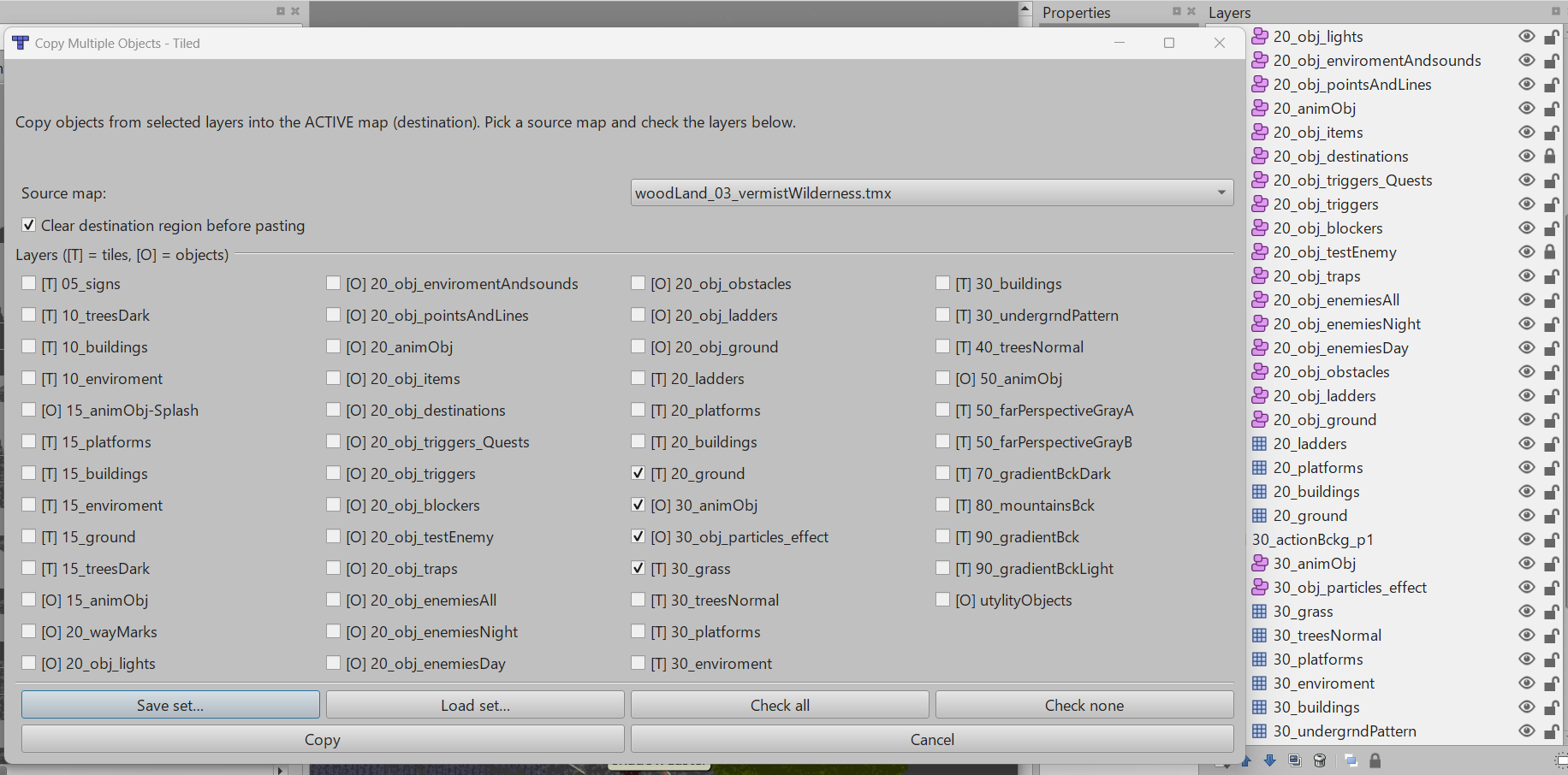
Edit → Copy Multiple Objects. - In the popup dialog, choose your source map, toggle your clearing preferences, check the layers you want to transfer, and hit Copy!
⚠️ Crucial Notes for Cross-Map Copying
The extension fully supports copying tiles and objects between different map files opened in Tiled. To keep your project data safe and clean, please keep these rules in mind:
- Unique Layer Names: Because the plugin matches layers across maps by their names (allowing cross-map copies to work regardless of different group folder structures), layer names within a single map must be completely unique. If you have duplicate layer names (e.g., "Collisions" in two different groups), the plugin will safely abort and display an error.
- Remapping by Tileset Name: Tiles and tile-objects are remapped in the destination map using the tileset name and tile ID. This works seamlessly if both maps share the same external tilesets (e.g., shared
.tsxfiles). - Pre-flight Validation: Before applying any changes to your destination map, the plugin performs a safety check. If any selected layers or required tilesets are missing in the target map, it will copy nothing and give you a detailed error checklist.
- Clear vs Overlay: Leaving "Clear destination region before pasting" checked will completely wipe out any existing tiles or objects inside the destination rectangle (based on their
(x, y)anchors) before pasting, making it a perfect clone. Turning it off turns the operation into an overlay, leaving your pre-existing destination layout intact underneath empty source cells.
Download
Install instructions
Installation
In Tiled, go to: Edit → Preferences → Plugins and click the Open button to access your extensions folder. Copy the copyMultipleObjects.js script file into that folder. Tiled loads extensions automatically on startup or whenever the file changes.
The command will appear under the Edit menu as "Copy Multiple Objects".
Note: The offset between the copy and paste markers is snapped to the tile grid, so tiles and objects stay perfectly aligned even if you draw the markers a few pixels off-grid.
Leave a comment
Log in with itch.io to leave a comment.